

The new beta feature Move Subscriptions is available in the Subscription entity on the Subscription page.
Currently, moving subscription features works for Recurring Billing contracts (Advance billing Policy) to Item-based contracts (Advance billing policy) only.
Navigation: Subscription ➤ Work 365 Dropdown ➤ Move Subscription

Allows users to choose the Target Billing Contract where the Work 365 user wants to move the subscriptions. Target Billing Contract must be Item based with an Advance billing policy. Multiple subscriptions can be moved via this new feature.
Subscriptions can be moved for the current and past dates only. The future date is not supported.

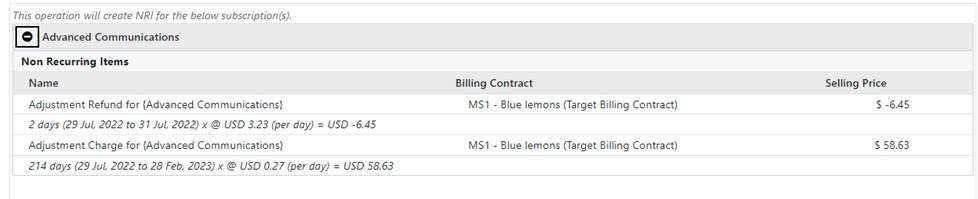
The move subscription action will create 2 types of non-Recurring items (NRI), if applicable.
- Adjustment refund
- Adjustment charges
The NRI will be available in the target billing contract or source billing contract.

Billing Schedules which will be created under the subscription based on the start date. Newer billing schedules will show status as pending.
However, the billing schedules before the “Apply on “date will be updated with Status “Invoiced”.
Please Note: The feature is currently under preview. The work 365 teams would appreciate feedback on this feature. Please post feedback on Work 365 Yammer Group.

