

Update Subscriptions Price Page
Update the existing subscription’s cost price, selling price, or both with just a few clicks.
Users can see subscriptions and the comparison to products on this page. Filters at the top row for Product, customer, Billing contract, currency, price list, commitment end date (On or Before).
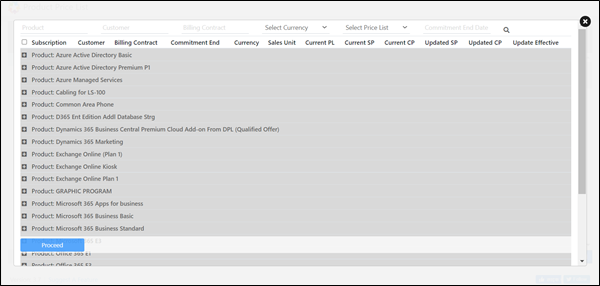

- Users can see the highlighted subscriptions prices which do not match the product price as per the new Price List updates by Microsoft
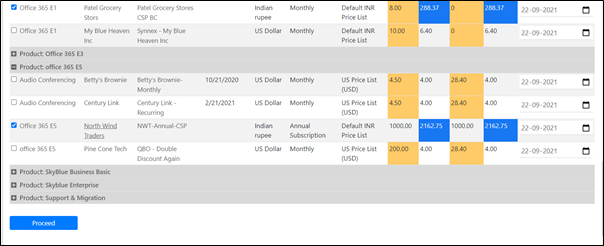
- The subscriptions will show the current cost price and current selling price. These will be compared to the updated cost price and selling price from the product. Any subscriptions with differences in selling price or cost price to the product prices will highlight the differences.
- Selling Price is highlighted in yellow color and Cost price is blue color
- The effective date field on each subscription row defaults to the commitment end date+1.
- Checkboxes on the left so users can control which subscriptions are updated
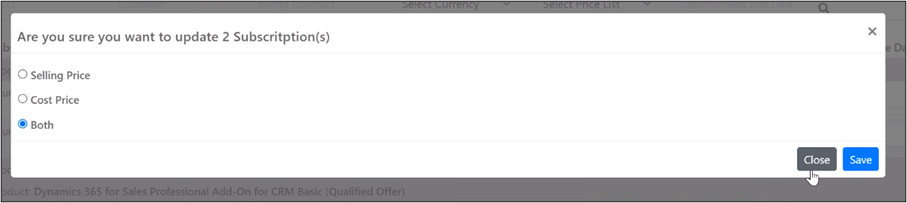
Option to update only Cost price, Selling Price or Both
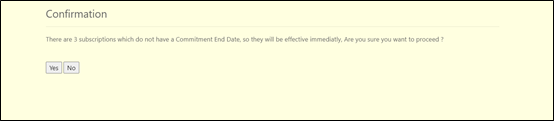
Warning Massage to confirm that there are few subscriptions that might not have a commitment and dates and that whatever the change we are doing is going be effective immediately.
Depending upon an update effective date either a regular Audit price update License change Log is created, or a Scheduled License Changelog.


