
Onboard With Confidence.
Work 365 onboarding is structured, transparent, and built for CSPs like you. Whether you run an MSP, ISV, or distribution business, we get you live fast with a dedicated onboarding manager beside you the whole way.
Tailored Paths for Every Role
Onboarding is mapped to what each person owns, so everyone knows their part from day one.
Partner Ops / Billing Managers
Set up automated invoicing and reconciliation, then own the daily run.
Billing automation ›Finance and Accounting
Configure compliance, revenue recognition, and reporting during setup.
Finance and operations ›Practice Leads (Azure, M365, D365)
Map your Microsoft New Commerce Experience offers into billing.
Azure usage billing ›Executives / RevOps
Watch margin and cash flow come together across the business.
For technology leaders ›Licensing Specialists
Streamline subscription changes, license adjustments, and usage billing.
For licensing specialists ›The 4 Major Steps of Onboarding
A repeatable path with clear outputs at every stage, so you always know where you are.
Configure and Customize
Set contracts, tax rules, invoice templates, and optional PSA mappings.
Automate and Validate
Run your first invoices and reconciliation reports.
Scale and Optimize
Add multi-currency, linked subscriptions, usage billing, and revenue recognition.
How Long It Takes
Milestones stay the same at every size. Duration adapts to your setup.
The typical path from kickoff to live billing.
Lean setups can go live in as little as two weeks.
Phased rollout across regions and entities.
Duration adapts to your data quality, provider count, and PSA or accounting scope. The milestones do not change.
Moving From Another Billing Platform?
Your onboarding manager runs the cutover with a migration checklist and templates. We rebuild your contracts and billing logic in Work 365, run trial invoices in parallel, and validate your first live invoice before switching over. See how Work 365 compares on the CSP billing platform overview.
Infinity Group made the same move to Work 365 from another billing platform, with no break in billing through the transition. Read the customer stories.
What We Need vs. What You Get
No surprises. Here is exactly what we ask of you, and exactly what you walk away with.
A little access and a small team
- Create a support user with access: Global Admin, Power Platform Admin, and Microsoft Partner Center Admin.
- Provide PSA or accounting admin access for integrations. Data clean-up is owned by you.
- Provide branding elements, a custom domain, and SSL for your customer self-service experience.
- Assign Power Platform and Dynamics licenses and security roles to project users.
- Nominate a Project Manager, Technical Lead, and Billing or Data Owner, plus users from Sales, Billing Ops, and Finance.
A configured, validated, live platform
- A dedicated Onboarding Manager from day one.
- Work 365 installed and configured, with your providers connected.
- Products, prices, and subscriptions synced, and default billing contracts created and validated.
- Go-live validation of your first invoice.
- Work 365 ENGEN, your branded customer self-service experience, set up with a custom URL and SSL.
- Your team trained on daily tasks, license change management, PSA push, accounting handoffs, and reconciliations.
- Access to Office Hours and the knowledge base, plus a migration checklist and templates.
The Shift Work 365 Makes
Once billing and operations run on one platform, here is what changes in day-to-day work for each team.
Sales Teams
Today: flexible terms are hard to promise when billing cannot keep up.
Customer Service
Today: every license change means a ticket to billing or manual Partner Center work.
Billing and Operations
Today: month-end means manual spreadsheet reconciliation across Partner Center usage and contracts.
Finance Teams
Today: MRR, ARR, and margin visibility are limited and recognition is inconsistent.
End Customers
Today: customers wait on billing updates and open tickets for every license change.
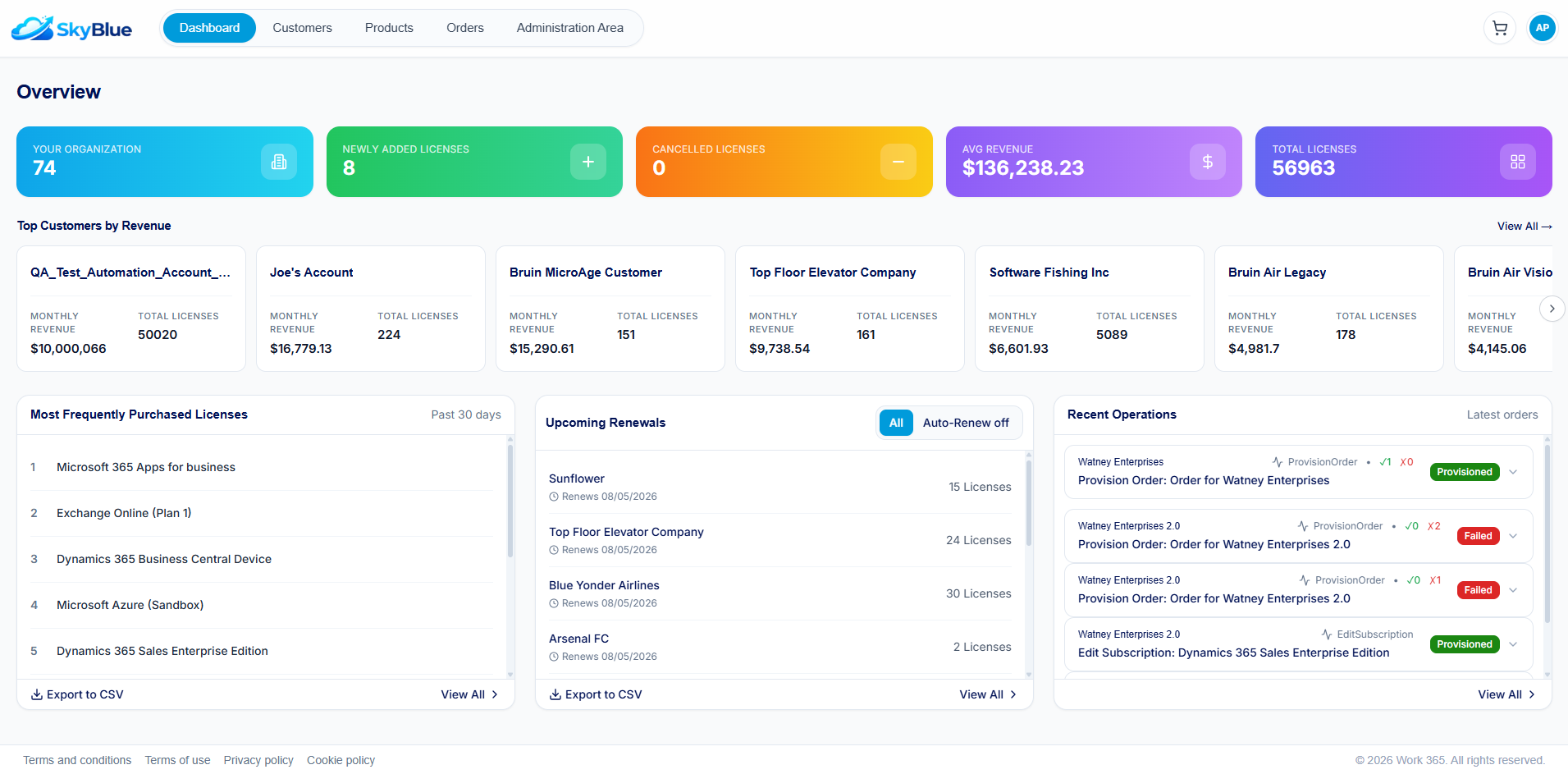
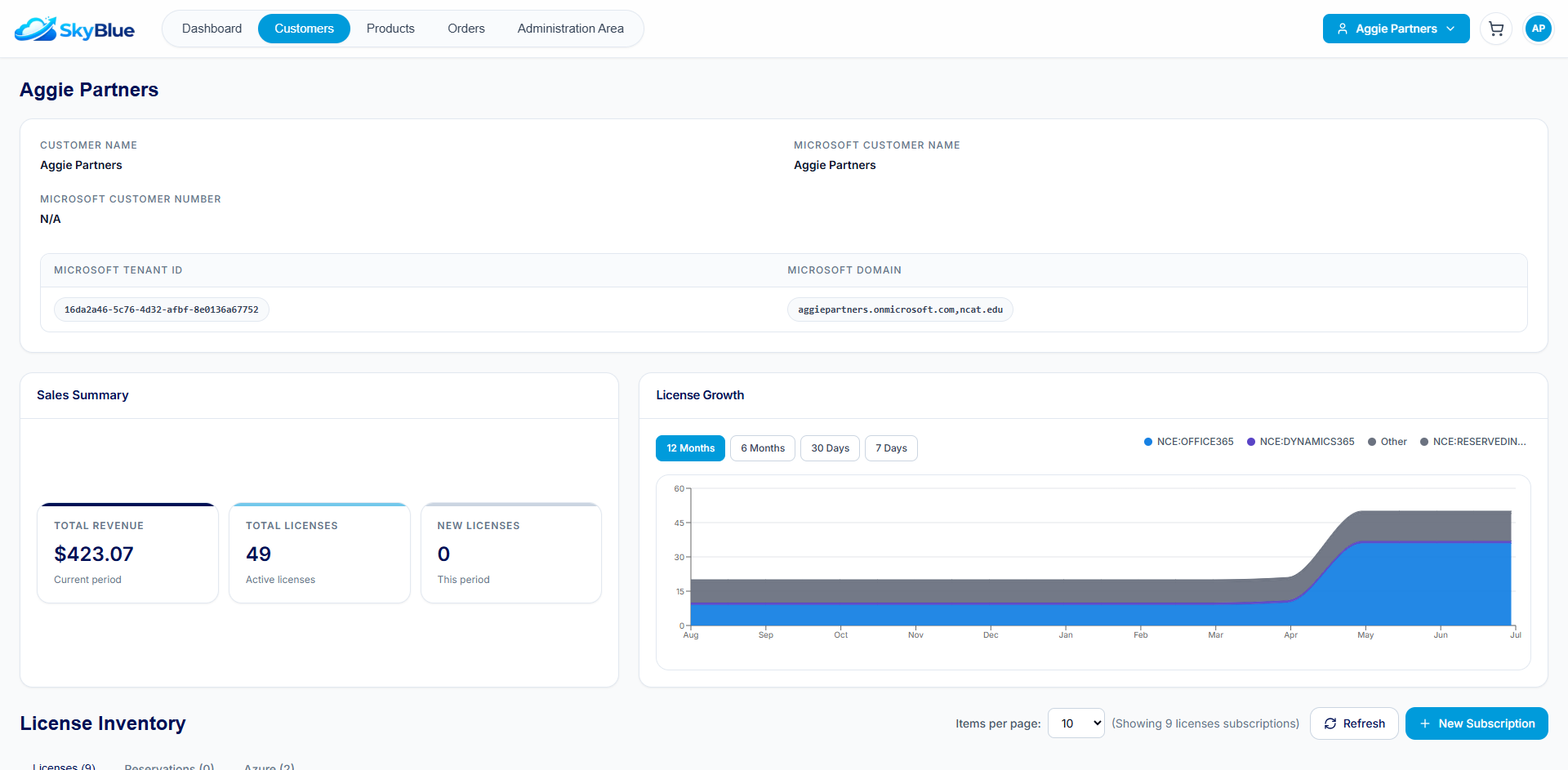
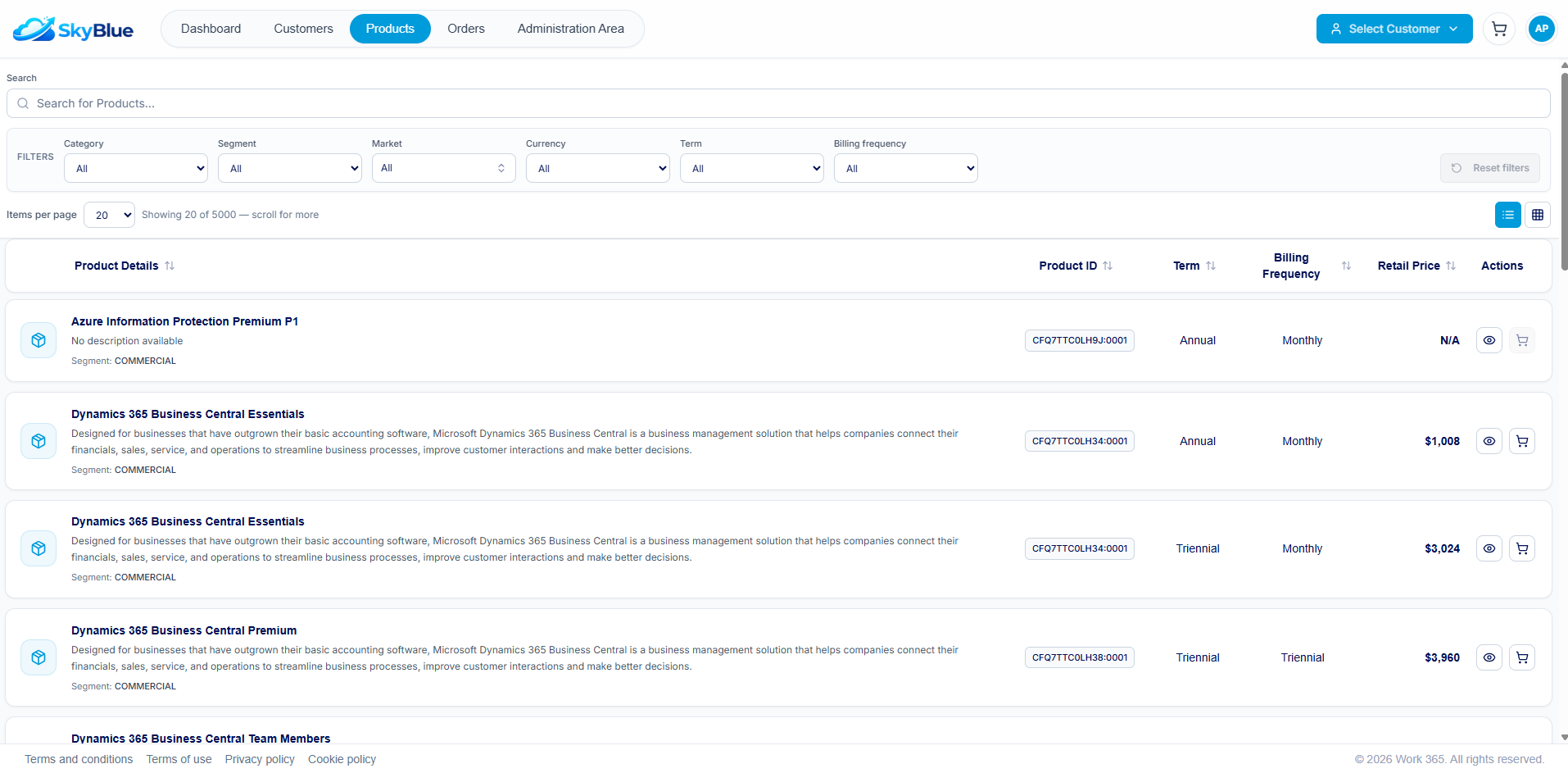
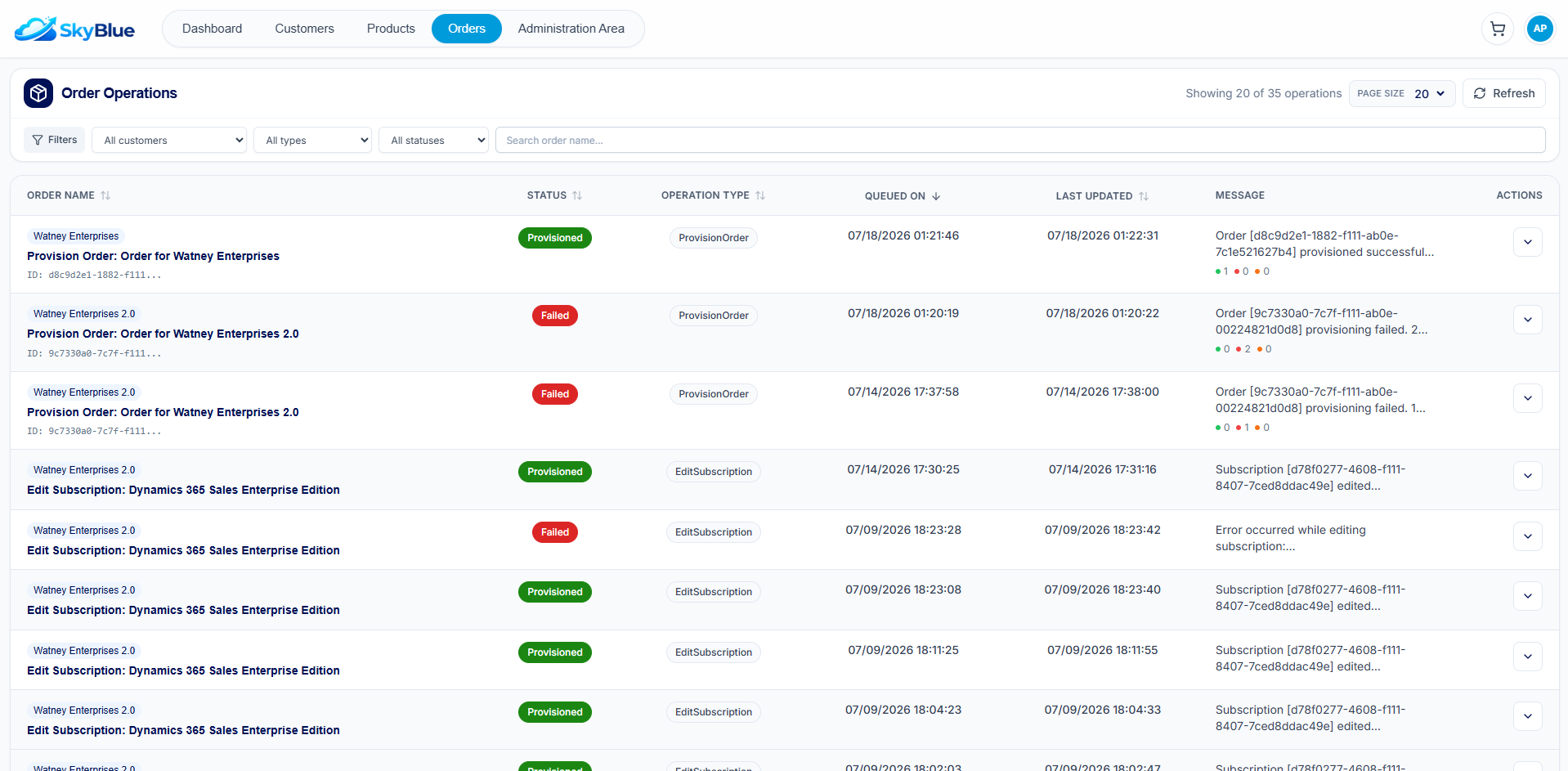
One platform. Complete operational visibility.
Manage customers, products, subscriptions and order operations from one intuitive self-service experience.
How We Do It
Four foundations that make onboarding fast and the platform durable.
Microsoft-Native
Built on Dynamics and Power Platform. Our technology ›
Revenue Event Model
Capture every revenue event so nothing leaks.
Flexi Billing Contracts
Bill in advance, in arrears, multi-currency, at any frequency. Learn more ›
Scalable Support
Office Hours and CSM-led training.
What Our Customers Say
"Watertight billing. That nervousness around revenue leakage has gone away."
CSP growth at Innovia Consulting, without adding headcount.
Revenue leakage recovered at GadellNet, with ROI in 3 months.
Finance ops roles needed at TSG after standardizing on Work 365.
Onboarding, Answered
How do you integrate with our accounting system and PSA?+
How does Work 365 ENGEN, the customer self-service experience, work?+
Who needs to be involved on our side?+
How long does onboarding take?+
We are switching from another billing platform. How does migration work?+
How much does Work 365 cost?+
Will our current billing keep running smoothly during onboarding?+
What happens after onboarding?+
Still Evaluating? See How Work 365 Fits Your CSP Business.
Get a Proof of Value before committing, and see your own numbers running through Work 365.
Get a Proof of ValueProducts

Solutions
Reach Us
11710 Plaza America Dr. Suite 2000, Reston, VA 20190, USA
sales@work365apps.com
+1-571-429-5171
