
Advanced Reporting Options Using Report Scheduler Add-on for Microsoft Dynamics CRM 2016 Online and On-Premise
Report Scheduler Add-on for Microsoft Dynamics CRM
Report Scheduler add-on for Microsoft Dynamics CRM 2016 Online and On-Premise allows easy scheduling of out-of-the-box CRM views, as well as the user, created personal views which can be received in the email automatically based on the scheduled pattern.
This blog is in continuation of my previous two blogs:
- Report Scheduling and Email Subscription for Microsoft Dynamics CRM 2016 Online and On-Premise
- Event Reminder using Report Scheduler for Microsoft Dynamics CRM 2016 Online and On-Premise
This blog shows some of the sample reports created using the Report Scheduler(Version 3) add-on: (Please note that Version 3 adds GroupBy and Date Formatting functionality. This will be released mid-June.)
- Opportunity established Close date approaching in next 7 days
- My Daily Activities reminder
- New Leads added to my team today
- Open Cases by Priority
- Birthday or Anniversary Reminder
- New Accounts added this week
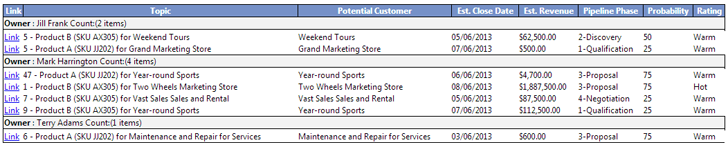
1. Opportunity established Close date approaching in the next 7 days:
The estimated close date is the date the opportunity is expected to be closed. Since this date is the base to calculate the forecast, it would be a good idea to set a reminder for all open opportunities that are approaching their close date.
Advanced Find View Filter condition:
Report Scheduler Configuration:
|  |
 | |
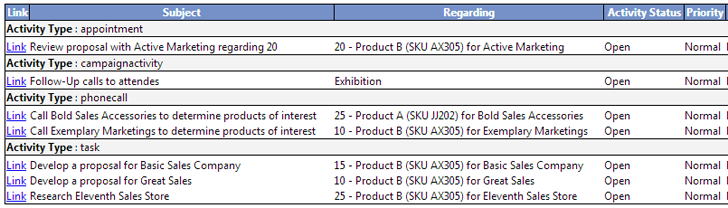
2. My Daily Activities reminder:
If you have your To-Do task list in CRM with a due-date populated then you could schedule a daily email reminder of your open activities:
Advanced Find View Filter condition:
Report Scheduler Configuration:
|  |
 | |
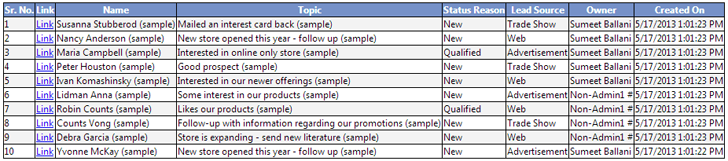
3. New Leads added to my team today:
A Sales Manager would like to receive an update of new leads added to his team every day.
Advanced Find View Filter condition:
Report Scheduler Configuration:
|  |
 | |
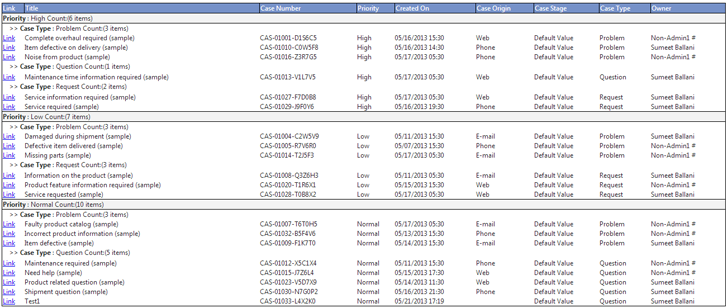
4. Open Cases by Priority: (Multiple-Group By Clause)
A Service Case Manager would like to receive a daily report of open Cases (troubled tickets) grouped by priority so that necessary action could be taken.
Advanced Find View Filter condition:
Report Scheduler Configuration:
|  |
 | |
5. Birthday or Anniversary Reminder:
CRM Users could get a weekly reminder email of their contacts who’s Birthday / Anniversary falls in the next X days.
Advanced Find View Filter condition:
Report Scheduler Configuration:
|  |
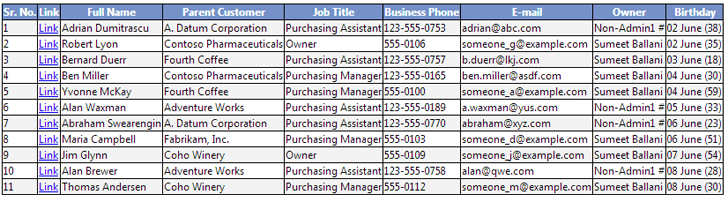 | |
The report also automatically calculates the Age and displays it along with the Birth date.
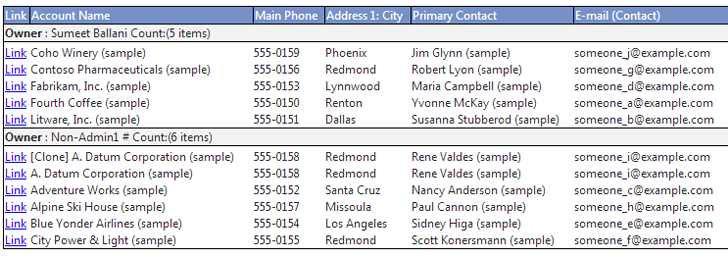
6. New Accounts added this week:
Account Manager would be interested in the Weekly report of New Accounts added by team:
Advanced Find View Filter condition:
Report Scheduler Configuration:
|  |
 | |



